Motivation
I wanted my own little corner of the internet. A static site removes much of the maintenance concerns, while a modern generator offers plenty to play with.
Why Astro?
There are a lot of great options out here, to name a few:
I suppose any will do as long as you like the template engine and language used to extend it.
I already have plenty of experience with TypeScript and Angular, plus a bit with React/Vue, so Astro’s component model made a lot of sense. Plus I’ll be writing some client-side JS anyway.
Getting started
Installation / pnpm
We’re civilised people around here so we use pnpm.
As far as setting up the project goes, everything you need can be found in the Astro docs.
pnpm create astro@latestAs far as CLI helpers go, Houston was pretty straightforward to use. Picking the blog starter template provides a decent starting point.
Picking a starting theme
This is entirely optional - I tried a few from Astro’s gallery, but was never really satisfied with them. If you’re going to customize, I’d recommend sticking to something basic.
Astro isn’t complicated. Many features are available through plugins, and writing your own components is easy enough. Picking a feature-packed theme if you intend on making it your own essentially burdens you with whatever “debt” has accumulated in the starter:
- Major versions may have changed (ex: Taiwind4 vs Tailwind3, if that’s your thing)
- Integrations may have been added / deprecated
- Some patterns / workarounds may have been made unnecessary
By anchoring yourself to a heavy, existing starter, you essentially deprive yourself of a learning opportunity, and take on unnecessary work to undo-redo some of the stuff.
A better way to use those is to look at the live demos for inspiration about which features you like, and trying to re-implement them with a modern standard.
I went with UINUX GitHub / Demo.
I really liked the ideas (blog posts) used to showcase the starter. While writing this I realised they’ve updated the system to handle tags - not something I need right now, but I’ll definitely have a peek later on.
Poking around
Before going further, it may be a good idea to pad the site with placeholder content. One good use of AI here is to generate some slop articles; it looks better than Lorem Ipsum, and the models can produce markdown format, which makes it easy to feed into the parser and focus on the design work.
Just make sure you don’t inadvertently publish them.
Humble beginnings
Let’s start with a simple change: I’d like to keep only the latest posts on the home page.
const posts = (await getCollection("posts")) .sort((a, b) => b.data.date.valueOf() - a.data.date.valueOf()) .slice(0, 5);Slicing the posts array is enough to limit what is displayed on the homepage.
Of course, pagination is not handled yet, but that will come later.
Fixing some styles
It seemed like the search results weren’t styled properly.
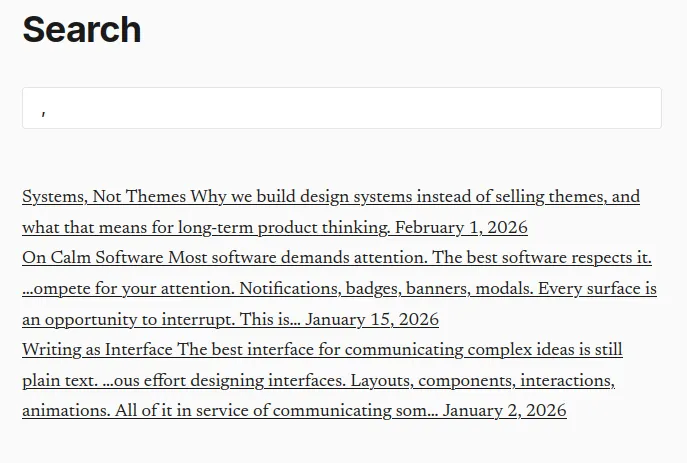
Turns out this happens because Astro is too good at what it does: Scoped styles are tree-shaken at build time, and scoped to the elements that exist on the page.
a.search-input-wrap[data-astro-cid-rwvr7nxs] { margin-top: var(--space-lg); margin-bottom: var(--space-xl);}#search-input[data-astro-cid-rwvr7nxs] {}Because there’s no “search” at build time, there are no results, and the styles are lost. The workaround for that is to make them global by one of two ways:
- Moving them over to
global.css - Adding a
:global()directive around the css selector
I picked the former, but that would soon not matter.
Refactoring: ArticleCard
The problem
While working on the search page, I noticed that the code for the displaying the posts was almost a 1:1 copy of the index page. There were subtle differences in the styling but those were also mostly the same rules under different names.
Extracting a new component while giving it a fresh coat of paint sounds a bit more complex than fixing styles or slicing an array, but it’s also the core of the engine, so it can’t be that hard.
Enter the card component
---import type { CollectionEntry } from "astro:content";
interface Props {    post: CollectionEntry<"posts">;}
const { post } = Astro.props;
const formattedDate = post.data.date.toLocaleDateString("en-UK", {    year: "numeric",    month: "numeric",    day: "numeric",});---
<article class="post-item" id={`article-${post.id}`}>    <a href={`/posts/${post.id}`}>        <h3>{post.data.title}</h3>        <p>{post.data.description}</p>        <p class="article-meta">            <time datetime={post.data.date.toISOString()}>{formattedDate}</time>        </p>    </a></article>
<!-- Scoped styles omitted for brevity -->
That is quite a big change. I move away from the ul / li to instead have one
article tag per… well, article.
Another change is that I now have an h3 tag as part of the card’s DOM. This is
intentional, as I restructured the index to include a
<h2>Recent articles</h2>.
Tag hierarchy being preserved, I can move on to the second page which used the
ul / li pattern.
Creating an “Archive” page
Having introduced a cap to the number of posts to the home page, I need a way to access other entries - preferably in a format that is easier to navigate than an RSS feed.
I wrote an archive page sorting the posts from newest to oldest, grouping them
by year. I threw in a <h2>Year</h2> tag for each - and voilà!
---import ArticleCard from "../components/ArticleCard.astro";import Layout from "../components/Layout.astro";import { getCollection, type CollectionEntry } from "astro:content";import { SITE_DESCRIPTION, SITE_NAME } from "../site.config";
type Post = CollectionEntry<"posts">;
const posts: Post[] = [...(await getCollection("posts"))].sort( (a: Post, b: Post) => b.data.date.valueOf() - a.data.date.valueOf(),);const postsByYear: Record<string, Post[]> = {};
posts.forEach((p: Post) => { const year: number = p.data.date.getUTCFullYear(); if (!postsByYear[year]) { postsByYear[year] = []; } postsByYear[year].push(p);});
const years = Object.keys(postsByYear).sort((a, b) => +b - +a);---
<Layout title="AI prompts You - Archives"> <section class="home"> <header class="home-header"> <h1>Archives</h1> <p>Past writings, in antichronological order.</p> <div class="search-input-wrap"> <label for="search-input">Search the archives</label> <input type="text" id="search-input" autocomplete="off" autofocus /> <p id="search-hits"></p> </div> </header>
<div id="article-list"> { years.map((year) => { return ( <section> <h2> <span>{year}</span> <span> ↓</span> </h2> {postsByYear[year].map((post) => ( <ArticleCard post={post} /> ))} </section> ); }) } </div> </section></Layout>I also used this opportunity to merge it with the existing search page: the feature didn’t need much work, and I figured it would make sense to have all the digging done in the same place.
Here’s how it looks now:
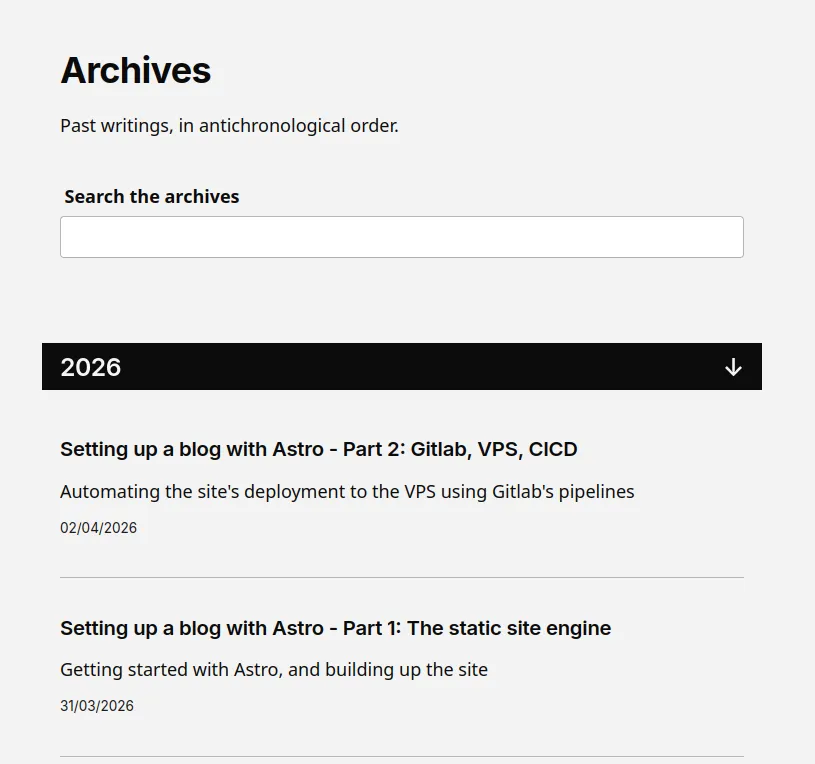
Not too shabby!
For the CSS part, here’s a relevant snipped that gives the blocks a nice animation when the search debounce timer expires:
/* These must be scoped to the ArticleCard */article { max-height: 12rem; transition: all 0.25s ease-in-out; visibility: visible; overflow: hidden;}article.hidden { visibility: hidden; max-height: 0px;}Adding previous / next buttons
Another small feature, another component:
---import type { CollectionEntry } from "astro:content";
interface Props { previous?: CollectionEntry<"posts">; next?: CollectionEntry<"posts">;}
const { previous, next } = Astro.props;---
{ (previous || next) && ( <aside> <h2>See also</h2> <nav class="prev-next"> {next?.id && ( <a href={`/posts/${next.data.slug}`}> <span>{next.data.title}</span> <span class="icon">🠚</span> </a> )} {previous?.id && ( <a href={`/posts/${previous.data.slug}`}> <span>🠘</span> <span>{previous.data.title}</span> </a> )} </nav> </aside> )}If the current article has either (or both) a previous or a next article, then the relevant buttons appear. But how do we compute this?
---import { getCollection, render } from "astro:content";import type { CollectionEntry } from "astro:content";import PreviousNext from "../../components/PreviousNext.astro";
const post = Astro.props;const { Content } = await render(post);
type Post = CollectionEntry<"posts">;
// Chronological orderconst posts: Post[] = [...(await getCollection("posts"))].sort(    (a: Post, b: Post) => a.data.date.valueOf() - b.data.date.valueOf(),);
function previousNext(id: string) {    const idx = posts.findIndex((post) => post.id === id);    let previous = undefined;    let next = undefined;
    if (idx - 1 >= 0) {        previous = posts[idx - 1];    }
    if (idx + 1 < posts.length) {        next = posts[idx + 1];    }
    return { previous, next };}
const { previous, next } = previousNext(post.id);---
<Layout    title={`${post.data.title} — AI prompts You`}    description={post.data.description}    ogType="article">    <!-- snip -->    <PreviousNext previous={previous} next={next} /></Layout>
By sorting the posts in chronological order, finding the index of the current post (which must exist, by definition), we can determine whether there are previous / next articles. We then pass those to our new component, and we’re done!
Lessons learned so far
Scoped styles
Scoped styles are useful but I’d rather not overuse them - any duplicated directive I would rather make global or extract to a component.
I have seen quite a few templates where there’s some confusion as to which rule
will apply: because of the way Astro scopes the styles, a cascading directive
from global.css which appears to be more
specific
than a scoped one may be ignored.
Search normalization
The search index is built at compile time, and served as a JSON file.
Here are a few improvements I made to it:
body: (post.body || "") .replace(/---[\s\S]*?---/, "") .replace(/[#*`\[\]()>_~|\\]/g, "") .replace(/\n+/g, " ") .replace(/\s+/g, " ") .normalize("NFD") .replace(/[\u0300-\u036f]/g, "") .trim() .toLowerCase(),What normalize does is split diacritics into two characters. The following
regex, courtesy of
Stack Overflow,
removes those extra characters.
By doing the same on both the search query and the body, accents will not trip me up.
Of course, this would probably not even be an issue if used PageFind, but that’s for another day.
Astro’s built in collection
Disclaimer: I may have hallucinated here.
When building the previous / next article buttons, it felt as if the Post
collection was sometimes backwards. Which makes sense, if you assume that Astro
builds it once and always returns the same array, given that JS’ sort method
works “in-place”.
I worked around that by using the spread operator [...articles] to clone it
beforehand. This might have been entirely unnecessary - I haven’t had the chance
to investigate yet.
Client Router and View transitions
If using the <ClientRouter /> for the view transitions, make sure to hard
refresh / restart the server from time to time, as it can cause caching issues
in dev mode.
What’s next?
In the next post, I’ll go over how I set up the VPS and the CI/CD pipeline that automates the deployment.